
Every profile, from a script or an AI agent.
A Local API on your computer whose v1 routes match AdsPower’s, plus v2 and v3; cloutctl for terminals and servers; and an MCP server that lets an AI agent find and open your profiles. Drive any of them with Playwright or Puppeteer over CDP.
import { chromium } from 'playwright';

// Start a profile through the Local API, then drive it over CDP.
const response = await fetch(`${baseUrl}/api/v2/browser-profile/start`, {
  method: 'POST',
  headers: {
    'Content-Type': 'application/json',
    Authorization: `Bearer ${token}`,
  },
  body: JSON.stringify({ profile_id: profileId }),
});
const reply = await response.json();
if (reply.code !== 0) throw new Error(reply.msg);
const browser = await chromium.connectOverCDP(reply.data.ws.puppeteer);- AdsPower-compatible v1Start, stop and list browsers, and manage users and groups, on the routes your scripts already call.
- v2 and v3Clearer routes for profiles, folders, proxies and engine preparation.
- cloutctlThe whole app from a terminal, including imports, as its own download.
- MCP for agentsThe MCP server reads the Local API token from your computer; the setup does not embed it.
Try it on your own accounts. Free.
Download free, import your profiles in minutes and pay $9 a month for 100 of them. Every plan is free for 3 days.
- 100 profiles for $9 a month
- Imports AdsPower, Multilogin, Dolphin, GoLogin, Kameleo
- Mac, Windows and Linux
Your AdsPower scripts keep working
Point them at Clout’s address and key. The v1 routes match AdsPower’s Local API: start, stop and list browsers, and manage users and groups.
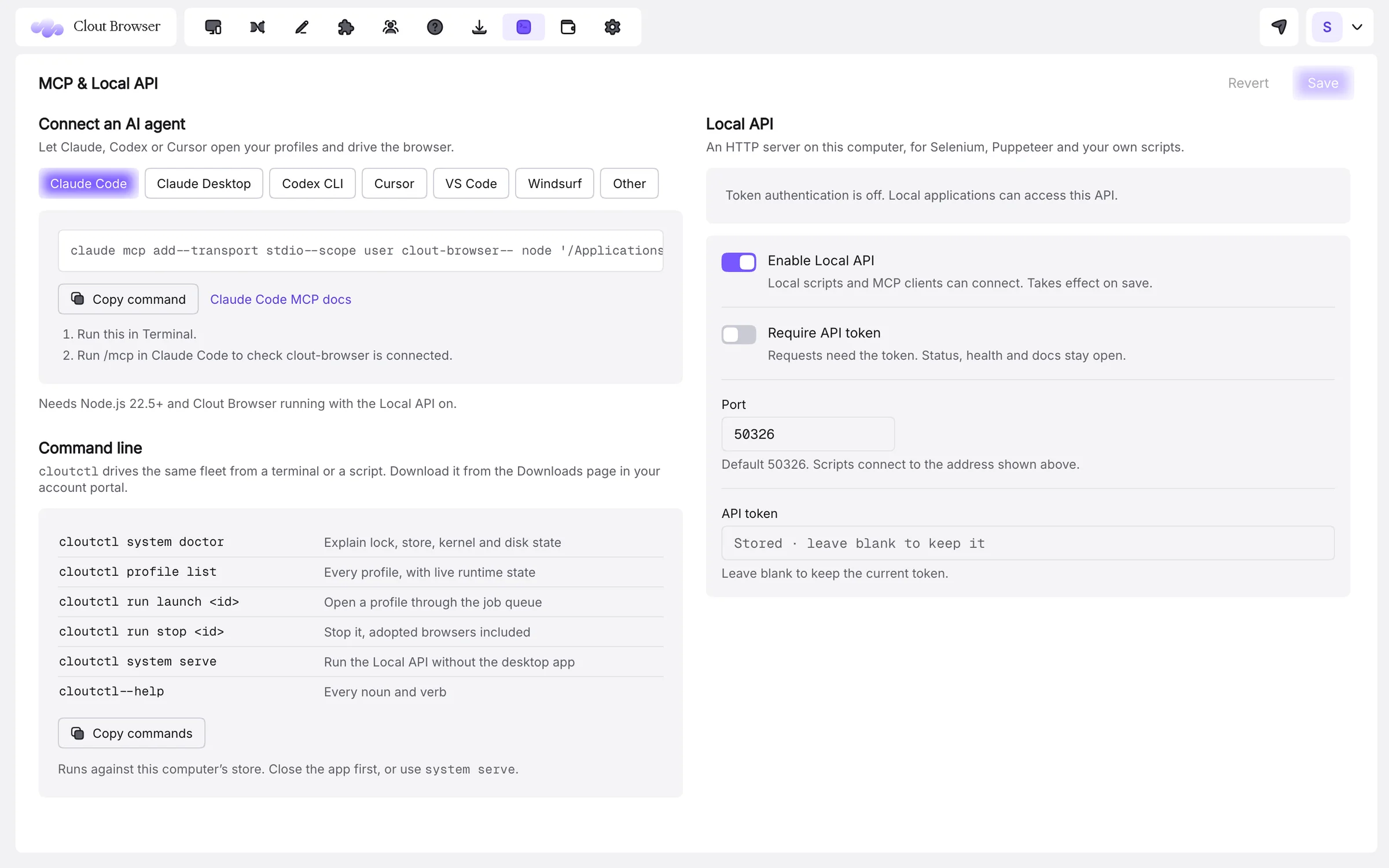
Playwright, Puppeteer and Selenium
Starting a profile returns its DevTools endpoint; connect Playwright with connectOverCDP or Puppeteer with connect, and the page you drive has the profile’s fingerprint, cookies and proxy.
import { chromium } from 'playwright';

// Start a profile through the Local API, then drive it over CDP.
const response = await fetch(`${baseUrl}/api/v2/browser-profile/start`, {
  method: 'POST',
  headers: {
    'Content-Type': 'application/json',
    Authorization: `Bearer ${token}`,
  },
  body: JSON.stringify({ profile_id: profileId }),
});
const reply = await response.json();
if (reply.code !== 0) throw new Error(reply.msg);
const browser = await chromium.connectOverCDP(reply.data.ws.puppeteer);An AI agent with its own browsers
Add the MCP server to Claude Code, Claude Desktop, Codex CLI, Cursor, VS Code or Windsurf from the app’s MCP & Local API page. The agent can find profiles, open one and work in it, through the same engine as everything else.
Every setting, documented.
The docs cover each screen and option, with the limits stated plainly.
Which AI clients can use the MCP server?
Can I rotate proxies from a script?
Does cloutctl need the desktop app?
Your accounts, each in its own browser. Today.
Download free, import your profiles in minutes and pay $9 a month for 100 of them. Every plan is free for 3 days.
- 100 profiles for $9 a month
- Imports AdsPower, Multilogin, Dolphin, GoLogin, Kameleo
- Mac, Windows and Linux
The rest of the browser.
A fingerprint that holds up, on every profile.
Read →ProxiesA proxy per profile, checked before anyone signs in.
Read →LiteTunnel™Spend less proxy data without changing a profile.
Read →TeamsHand over an account without handing over a password.
Read →Computers and syncYour profiles, on every computer you work from.
Read →ImportSwitch in an afternoon. Keep every fingerprint.
Read →Your accounts deserve a better browser.
One profile free for as long as you like. Every plan free for 3 days. Cancel any time.